Understanding the dashboard
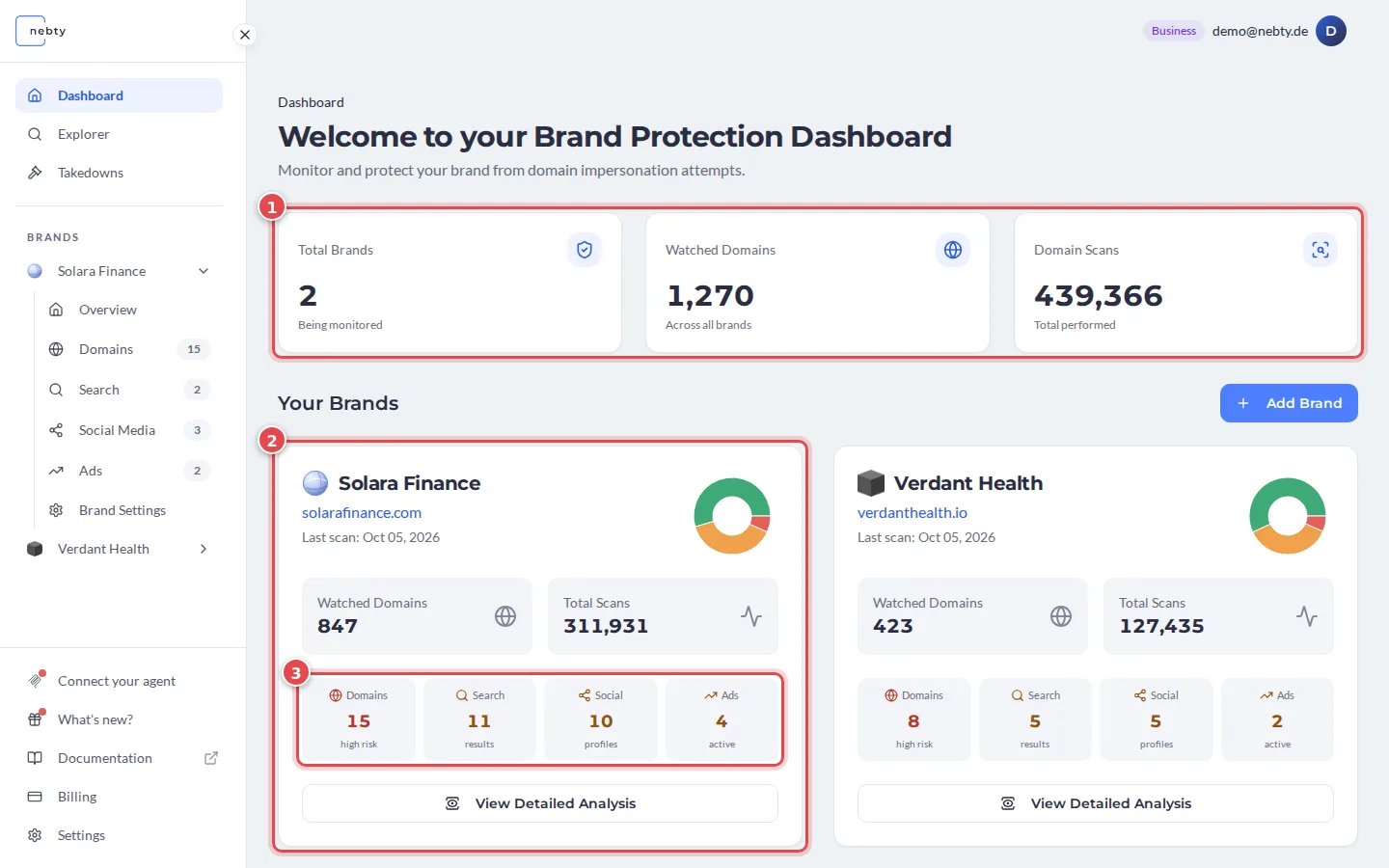
The dashboard is the first screen you see when you sign in to nebty. It gives you the state of your brand protection at a glance. The red numbers in the screenshot match the numbers in the text.
Brand cards
Section titled “Brand cards”Each brand you protect appears as its own card (2). A brand card is your entry point into that brand’s findings, which are grouped by channel: Domains, Search, Social Media, and Ads. The four small counts on the card (3) show how much nebty has found in each channel. Select View Detailed Analysis to drill into the impersonation activity nebty has found for that brand.
The three stats
Section titled “The three stats”Above the brand cards, three stat cards (1) summarize your account:
- Total Brands: how many brands you are protecting with nebty.
- Watched Domains: how many domains nebty is actively tracking on your behalf.
- Domain Scans: how many domain scans nebty has run.
Together these numbers tell you the scope of what nebty is watching. The brand cards below tell you what it has found.
With the layout clear, move on to reviewing your first finding.